Stay in touch
Subscribe to our mailing list for all the latest news and developments about Natural Capital Suite.

Truii acknowledges the Traditional Owners of Country throughout Australia. We pay our respects to Elders past, present and emerging.


Your first decision is the one you cannot undo. When you create a report card you choose how it handles time, and that choice is fixed for the life of the card. Rolling current is a single report card that is always up to date, where new data overwrites the old and earlier versions are not kept. Periodic instance preserves a separate report for each reporting period, reached through a date selector.
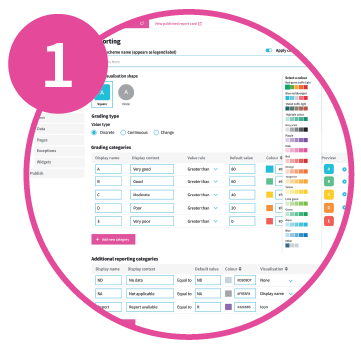
Choose your theme, layout, grading scheme and thresholds. The grade wording, colours and thresholds are customisable fields and can be changed at any time, so what needs care early is not the words but how they are applied.
Tip: Choose a scale that will still read sensibly against the last indicator you add, not only the first three.

Upload the GeoJSON file containing the location hierarchy and location codes. Add location descriptions and select a map style.
A page is created for every location and indicator combination, and your location codes become the key that every data file you upload afterwards has to match.
Tip: Settle your location hierarchy before you upload. Changing it later is possible but time-consuming.
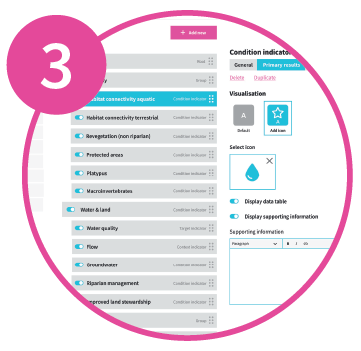
Decide what indicators you want to report. Each indicator can be a primary result (condition or target) that is graded, or a supporting indicator (context or alert) that explains a primary result. Organise them into groups and nested hierarchies (e.g. for sub-indicators).
Then set each one up by defining per-indicator grading threshold overrides, data confidence, visualisation options, which panels appear on which location level, and the supporting information behind each panel.
Tip: The indicator type is fixed at creation, so decide which indicators are graded primary results and which are context before you create them. Adding one later is simple; changing one’s type means rebuilding it.

Every indicator you create arrives with a data record already generated, populated with example data in the format that indicator type expects. Replace it by uploading your own .csv, or edit the record directly.
Tip: Download the generated sheet first and use it as your template. It shows the columns that indicator type expects, and it already contains every location code you have defined.

Page-level content is the text that explains the result for that particular location, and the widgets (images, boxed links and headline figures) attached to that page.
Page-level text can be added inside context data panels, and within text and note panels. A note panel can also have its content set once and shared across every page for that indicator.
Tip: You do not have to add page-level content to every page. On a card with several location levels and nested indicators there can be hundreds, so it is often worth adding it only at the top one or two levels.
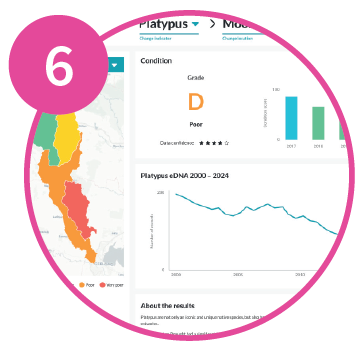
You define your own review stages, such as science review, comms review and approved, and mark where each page has reached. The Pages list shows every page in your report card with its review stage, who last edited it and when, whether it has changed since it was last published, and whether it is ready to go live.
Preview your report card. Then publish the pages that are ready, and share a link to your standalone report card or embed it in your own website.
Tip: Preview a page or two at your lowest location and indicator levels. Missing values and unreplaced example data may show up there, as those are the least likely to be checked by reviewers.
Subscribe to our mailing list for all the latest news and developments about Natural Capital Suite.
Truii acknowledges the Traditional Owners of Country throughout Australia. We pay our respects to Elders past, present and emerging.


